Sunday, 24 January 2021

The value of a platform approach in a cloud-native environment

 A  potential challenge that IT teams face when in a cloud-native environment is working within a highly distributed ecosystem with multiple moving parts, such as microservices and containers. If design patterns are not followed or implemented correctly, achieving maximum value can be a challenge. Because of this, we recommend a platform approach for any organization looking to embrace cloud-native development.


How is a platform valuable?

A platform-centric approach provides a framework with best practices and proven patterns that have worked not just within a single organization but within others as well. A platform is a base set of capabilities and features that provide the foundation to optimize and innovate, in this case within a cloud-native environment. It can encompass technology elements as well as processes. For example, we worked with a global wireless carrier to establish two platforms: one was based on microservices with a standard technology set and the other a DevOps implementation containing standard tools, processes, and technologies. A platform can integrate with partners, suppliers, and consumers and drive your business capabilities.


From a modernization standpoint, a platform provides the infrastructure for transforming from haphazard communication between legacy systems to well-defined reusable services. This standardization allows a company to react to change faster. A platform is horizontal and sits outside any specific line of business, which facilitates standardization that simplifies the process of making technical changes while promoting efficiency and scalability. For example, Capgemini worked with an organization to build a NoSQL datastore when the traditional online database became a bottleneck. The underlying platform capabilities, such as the event bus, were essential for the technical team to make a decision on a solution, pilot it quickly, and launch to production without an impact on operations.


What should a platform consist of?

A platform is essentially a pre-defined set of APIs and services that enable and support applications, data, and business capabilities for the enterprise. It can include operational, orchestration, data, and network components as well as lead up to AI algorithms, DevOps tools, and security services. These pre-defined APIs and services can also be specific to your business and technology, as in the case of core business functionalities that are exposed by legacy wrappers for consumption by the business. A platform also includes a mechanism for standardizing across lines of business, allowing specific teams to request features via self-service provisioning. It also includes a sandbox for trying out new capabilities to be added.


Should you build or buy your platform?


A platform exists to facilitate the rebuilding of the portfolio and should improve processes. When thinking about how to construct a platform, you can opt to build these capabilities in-house or leverage third-party services like Kubernetes or PaaS features from a cloud provider.


Technical leaders should look at platform roadmaps to progressively migrate business operations from existing systems to platform capabilities. For example, re-architecting a legacy monolith as PaaS services requires the use of existing re-usable and production-proven capabilities that maximize efficiency and reusability. This is, in essence, a shift to a platform approach, facilitated by the process of application modernization. In the platform approach, all modernized capabilities are built to be reused internally and externally, enabling the move to API monetization.


It’s important to remember that the transformation to a platform-centric approach will not happen overnight, and we don’t recommend going for a big-bang migration approach to a new platform. Rather, we recommend first conducting a pilot project with a group that embraces change, and then building from there.


 For more information, please check out The app-modernization manual: The definitive guide to building intelligent apps from Capgemini, or reach out. This was originally published by the author on https://www.capgemini.com/us-en/2021/01/the-value-of-a-platform-approach 

Sunday, 20 September 2020

API Security Testing Checklist

 API should be checked for the following from a Security perspective:

1. Denial of Service Attack https://owasp.org/www-community/attacks/Denial_of_Service

2. OWASP A6- Security Misconfiguration https://owasp.org/www-project-top-ten/2017/A6_2017-Security_Misconfiguration.html 

2. IP Access Control https://owasp-top-10-proactive-controls-2018.readthedocs.io/en/latest/c7-enforce-access-controls.html

3. MITRE CWE 250 Unnecessary Privileges - Basic Authentication

4. Ensure no direct access to database.

5. Access token authentication - e.g. OAuth* 2 with JWT for user authentication and authorization. 

5. API Key Generation & Validation - API providers should expose secure methods to provide authorization code or access tokens on demand.

Wednesday, 10 June 2020

Wednesday, 9 January 2019

List of bands I tune into

Checklist of my favourite bands for me to keep tabs on their latest offerings


A Perfect Circle discography

Bon Iver

Cary Brothers

Coldplay

Daughter

Dave Matthews Band

Favourite songs: Dont Drink The Water, Crash
Last Album: Away From the World

Duncan Sheik

Evanescence

Fleet Foxes

Frou Frou

Imagine Dragons

Imogen Heap discography
Favourite Songs: Monster, Radioactive


Jose Gonzalez

Joshua Radin

KT Tunstall

Last Album: Living Things

Mumford and Sons

Pearl Jam discography

Red Hot Chilli Peppers

Sarah McLachlan discography

The Corrs

The National
Last Album: I am Easy to Find
Favourite Songs: Ada, This is the Last Time, Tunnel Vision

The Weepies

Tori Amos

U2

Wednesday, 17 October 2018

Container Volume Options and Features

Background

Containers need a mechanism to store data, without which it will not be useful. Virtual Machines have the quality that once started, any modifications are saved as a new VM. Containers on the other hand are transient and are not designed to store any state that the application generates


Types of Container Storage needs

Image Storage:
The first is image storage. This can be provided with existing shared storage and has requirements much like platforms already built for distributing and protecting virtual machine (VM) images in server virtualization.
·       The benefit is container images are much smaller than golden VM images because they don't duplicate operating system code.
·       Also, running container images are immutable by design, so they can be stored and shared efficiently. There is a consequence, though, as the container image cannot store dynamic application data.
The second required data store is for container management
Again, you can readily provide this with existing storage. Whether you use Docker, Kubernetes, Tectonic, Rancher or another flavor of container management, it will need management storage for things like configuration data and logging.
Third storage require for container application storage:
It's the third type of storage, container application storage, that provides the most difficult challenge. When only supporting true microservice-style programming, container code can write directly over image directories and files
But containers use a type of layered file system that corrals all newly written data into a temporary, virtual layer. The base container image isn't modified. Once a container goes away–and containers are designed to be short-lived compared with VMs–all its temporary storage disappears with it.

Container Storage Options
·       Docker also has a concept of volumes, though it is somewhat looser and less managed. In Docker, a volume is simply a directory on disk or in another container. Lifetimes are not managed and until very recently there were only local-disk-backed volumes. Docker now provides volume drivers, but the functionality is very limited for now (e.g. as of Docker 1.7 only one volume driver is allowed per container and there is no way to pass parameters to volumes).
·       A Kubernetes volume, on the other hand, has an explicit lifetime - the same as the pod that encloses it. Consequently, a volume outlives any containers that run within the Pod, and data is preserved across Container restarts. Of course, when a Pod ceases to exist, the volume will cease to exist, too. Perhaps more importantly than this, Kubernetes supports many types of volumes, and a Pod can use any number of them simultaneously.

Container Volume Problems
·       On-disk files in a container are ephemeral, which presents some problems for non-trivial applications when running in containers. First, when a container crashes, kubelet will restart it, but the files will be lost - the container starts with a clean state.
·       Second, when running containers together in a Pod it is often necessary to share files between those containers.


Solution: The Kubernetes Volume abstraction solves both problems.
·       A Kubernetes volume, has an explicit lifetime - the same as the pod that encloses it. Consequently, a volume outlives any containers that run within the Pod, and data is preserved across Container restarts.
·       Of course, when a Pod ceases to exist, the volume will cease to exist, too. Perhaps more importantly than this, Kubernetes supports many types of volumes, and a Pod can use any number of them simultaneously. Kubernetes contains a property, volumeMounts. subPath, to specify a subpath inside the referenced volume.

Tuesday, 14 August 2018

Practical Learnings on Microservices

In a recent project, we delivered over 60 Microservices deployed on multiple Tomcat servers each in Production.

Below are some notes on real-life learnings.

Designing the Microservices:

•Business focus
•
Small services with CRUD operations on single business function or domain 
•Design
•Use Lightweight REST based communication (client-to-service and service-to-service)

        •Keep Loosely Coupled
       •Ensure Services are Stateless
•Appropriate design patterns such as Aggregator, Proxy & Branch Patterns are commonly used
•In unavoidable cases - there will be Distributed Transactions and need to design for them
•Resilience
•Must design for Failure – e.g. Delays, Errors or Unavailability of another service or 3rd party system.
•Provide default functionality in case of failures from a service
•Rely on Input Validation - (client-to-service and service-to-service)
•Observability
•Centralized Logging and Monitoring is a must across distributed microservices

•Log events for timeouts and shut downs
•Logging to include the level, hostname (instance name), message
•Log events can be used for capacity planning and scaling e.g. which services need higher instances
•Business data related metrics such as no. of Bookings, Time taken to fill out the form 
•Log events which can be used for capacity planning and scaling
•Automation
•Use Testing tools for integration of services
•Quick feedback on check-ins and failures in the CI/CD pipeline


Benefits:
§Independent Development teams
•Business domain-driven design
•Responsive to business changes
§Independent Deployments
•Minimal impact and regression testing for small fixes
•Able to quickly take down and redeploy one service without impact to the overall system or other functional services.
§Independent Scalability
•Slots well into on-demand hosting and cloud services for scalability 

§Reusability for other Enterprise projects

Constraints:

§Higher Complexity for developers initially
§Deal with error handling, timeouts, retry mechanisms
§Service versioning can get confusing and needs to be managed.
§Managing Distributed Transactions requires Design rework.
§Requires increased number of VMs to support environments adding to infrastructure costs
§Need clear deployment strategy at the start to identify which services will be deployed on which VMs
§Increased overhead for Configuration management and Rundeck/UDeploy deployments during project life cycle and in production as a result of 60+ separate code builds and deployments

§Across environments, there are 240+ Tomcat Servers in Production and 480+  Servers in lower environments


Monday, 26 May 2014

AWS deployment options - Part 3 - mod_proxy with autoscaling

Due to the limitation with mod_jk for autoscaling configurations, we took a look at mod_proxy


Instead of using AJP (mod_jk) protocol we can use the HTTP protocol and with this approach we do not use Apache for the actual load balancing or session stickiness. Instead all requests from the Apache server are forwarded to the application tier ELB (say it runs at HTTP port 8080) and the ELB does load balancing as well as maintains session stickiness.

The Apache httpd.conf configuration for the same is mentioned below.


LoadModule proxy_module       modules/mod_proxy.so
LoadModule proxy_http_module  modules/mod_proxy_http.so

ProxyPass /img !
ProxyPass /images !
ProxyPass /css !
ProxyPass /media !

ProxyPass / http://internal-RCCL-AppTier-ELB-722360436.us-east-1.elb.amazonaws.com:8080/
ProxyPassReverse / http://internal-RCCL-AppTier-ELB-722360436.us-east-1.elb.amazonaws.com:8080/


§Pros:

–ELB is able to maintain sticky sessions using it’s own cookie named AWSELB

§Cons:

–When we need to run multiple Tomcat JVMs on the same instance, this approach fails. For eg: If we have 6 Tomcats distributed as Server 1 on ports 8080, 8085, 8090 and Server 2 on ports 8080, 8085, 8090. In this case, on Apache we need to switch to mod_proxy_balancer and Apache will load balance across 3 ELBs running on 8080, 8085 and 8090 respectively.

–In such a scenario, session stickyness fails again as it again requires the same combination of unique node names (jvmRoutes) for each Tomcat instances and these need to be pre-defined on Apache as well. So we face the same issue on mod_jk See http://stackoverflow.com/questions/9393163/apache-tomcat-problems-with-sticky-sessions-and-load-balancing
 
So if you need a single Tomcat per JVM then this is the best solution.

For multiple JVMs there is an alternate recommendation given to us by Amazon support, and that is to use one ELB per port and set up the tomcat tier with multiple ELBs as shown below.

 
This will work provided you allocate the architecture and resources in the right manner.


Friday, 23 May 2014

AWS deployment options - Part 2 - mod_jk with autoscaling


If the application requires session stickiness at the Tomcat tier, i.e. if some user details are stored in the HTTP Session and you don't enable session replication across Tomcats. The solution is that the Elastic Load Balancer (ELB) maintains the sticky session using it’s own cookie called AWSELB. For ELB sticky session configuration see http://docs.aws.amazon.com/elasticbeanstalk/latest/dg/using-features.managing.elb.html
In case there is an external ELB (Apache tier) with cookies stickiness set, it will over-ride the internal ELB (Tomcat tier). The stickiness cookie is always named AWSELB, hence the external ELB will overwrite the cookie from the internal ELB. One option here is to set the Tomcat tier ELB with "Application Generated Cookie Stickiness" with value JSESSIONID so it will follow the Application cookie and maintain sticky sessions.
 

In case sticky session is not enabled on the application tier, and the user is forwarded to a Tomcat server where the session is not present, the user’s session information will be lost

There are various approaches available to maintain session stickiness, and these have been discussed below.
 
Option 1: Use mod_jk to get Apache to direct to the correct Tomcat

Option 2: Use mod_proxy

Option 3: No session stickiness, keep it stateless (which is what Amazon recommends)

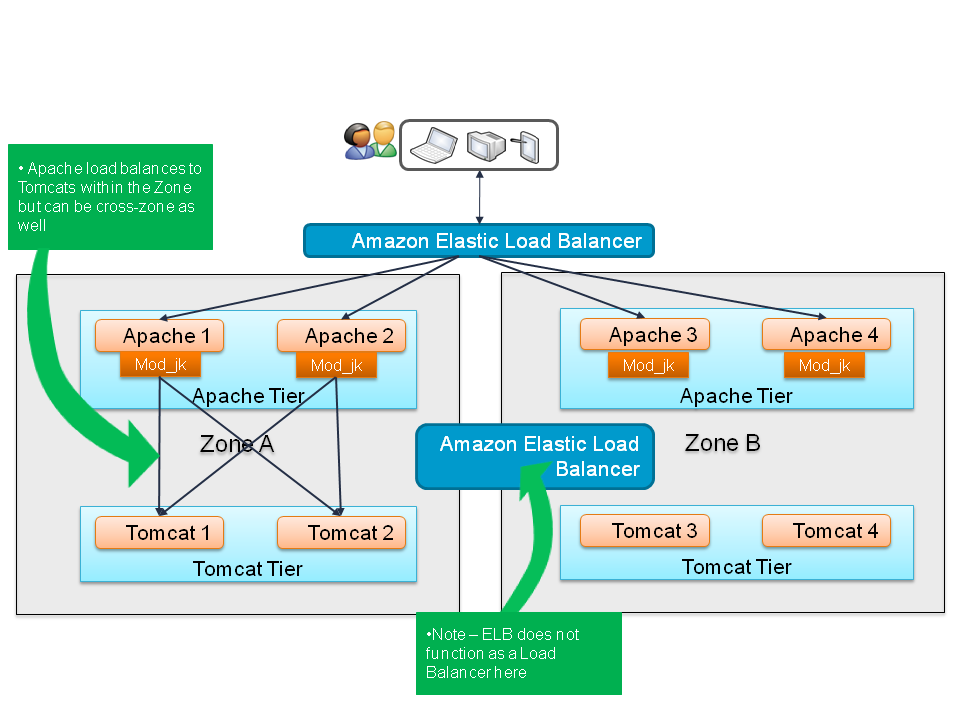
The mod_jk implementation looks like this
 
 
The Apache web server can maintain session stickiness along with load balancing i.e. The requests from the Apache server to the Tomcat server are load balanced along with maintaining session stickiness, by Apache server itself .(The application ELB is bypassed).
In this approach the Apache server needs to know the list of all possible Tomcat IPs.
When we set up autoscaling, Tomcat can start up new instances on any IP within the subnet. That's the way AWS works.
Hence this is not feasible as when we restart the AWS servers the IPs might change.


 Mod JK Configuration

The file “httpd.conf” at the location “/www/Apache/conf” needs to have the following entries. These entries indicate that the files from folders “img”, “images”, ”css” and “media” will be served locally where as rest of the requests will be forwarded to the load balancer “lb”.


LoadModule jk_module modules/mod_jk-1.2.30-httpd-2.2.X.so
JkWorkersFile conf/workers.properties
JkLogFile logs/mod_jk.log
JkLogLevel error
JkShmFile logs/mod_jk.shm
 
JKMount /status jkstatus
 
JkAutoAlias /apps/Tomcat/apache-tomcat-7.0.42/webapps
 
JkMount  /* lb
JkUnMount /img/* lb
JkUnMount /images/* lb
JkUnMount /css/* lb
JkUnMount /media/* lb


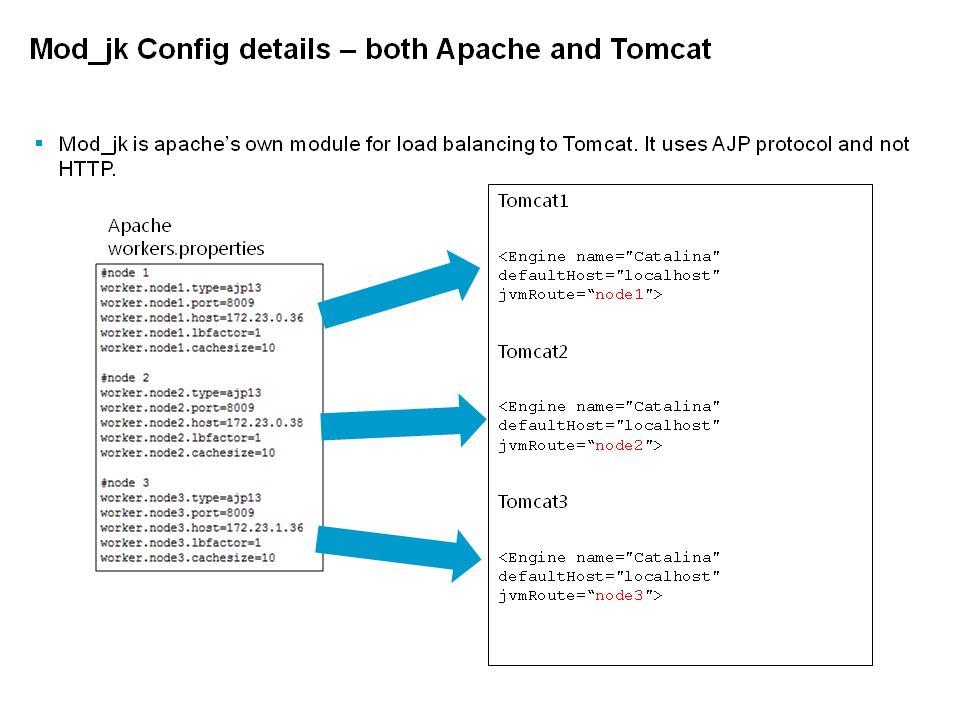
Also the file “worker.properties” will also need to be modified as indicated below.


worker.list=lb,jkstatus
 
#node 1
worker.node1.type=ajp13
worker.node1.port=8009
worker.node1.host=172.23.0.36
worker.node1.lbfactor=1
worker.node1.cachesize=10
 
#node 2
worker.node2.type=ajp13
worker.node2.port=8009
worker.node2.host=172.23.0.38
worker.node2.lbfactor=1
worker.node2.cachesize=10
 
#node 3
worker.node3.type=ajp13
worker.node3.port=8009
worker.node3.host=172.23.1.36
worker.node3.lbfactor=1
worker.node3.cachesize=10


 This maps to the Tomcat server.xml for each JVM


§Pros:
–Has very good support for failure detection and switchover to alternate Tomcat server.
–Use ELB for health checks and not for load balancing
§Cons:
–The session stickyness is using cookies like this jsessionid=AB327CD87667461357C95742BB9974B1.node1 which is maintained via configuration in Apache workers.properties. In this all Tomcat IP addresses and ports must be mentioned along with a logical name for each Tomcat (node1 in this case)
That logical name
must be the same as entered in each individual Tomcat server.xml as it’s “jvmRoute” as well. Thus we will have Tomcat node1, node2 .. nodeN
–This affects autoscaling because Tomcats will be a new instance autoscaled on any available IP (from a set of IPs) and it’s not possible to hardcode a “nodeX” in Tomcat when it is launched via autoscaling
For this reason we next take a look at mod_proxy